


Verifying Your Links


As your backlink profile keeps growing, it's important to keep track of your newly built links and check if they are in place, have the right anchor text, and don't get under a Nofollow tag.
LinkAssistant keeps all your backlinks in one place, plus it makes the process of analyzing them easy and efficient.
To verify a backlink in LinkAssistant, do the following:
- Select the links you want to check and hit Verify.
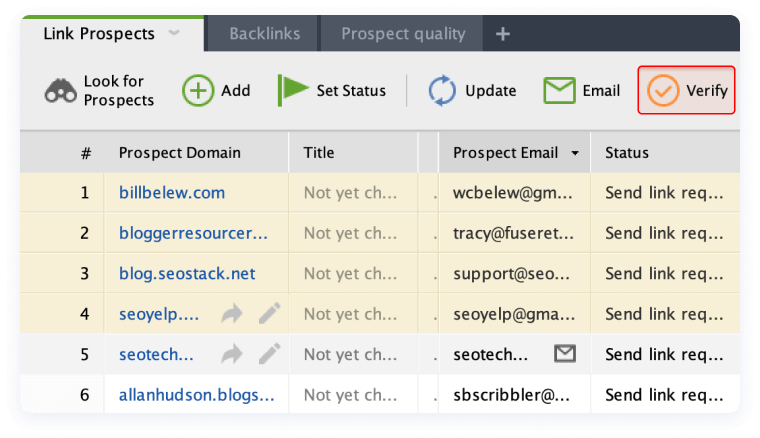
- In the pop-up window, select Scan only current page and click OK.
- Once the verification is complete, right-click the header of any column in your LinkAssistant workspace, select Verification Passed from the list of available columns, and hit OK.
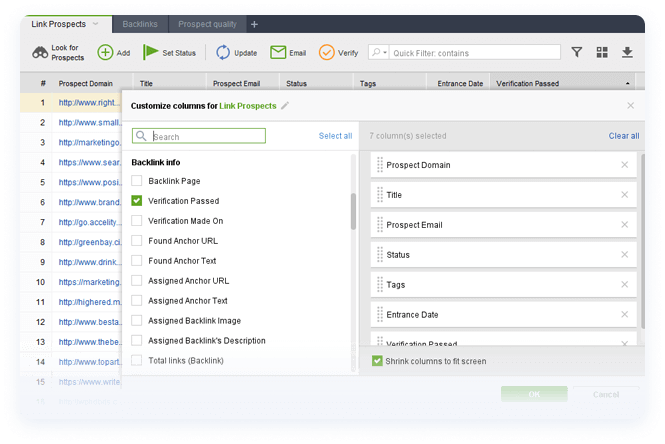
Now, you have to walk through all of your link building partners and check the Verification Passed column. Look out for links that come back with a No status (these links are no longer found on the backlink page), get under a Nofollow tag, or have wrong anchors.
When necessary, contact your link partners right from LinkAssistant (by selecting the partner in your workspace and hitting Email in the toolbar) and shoot them a message explaining your problem or request.
Remember to regularly check your inbox in LinkAssistant's Email module, and try to promptly respond to partners' emails.
Congratulations! That's all for the Link Building part of your 30-day SEO Plan. By now you should perfectly know how to:
- Reveal your competitors' backlink profile
- Spot guest blogging opportunities
- Get backlinks from the forum and blog commenting
- Place backlinks in business directories
- Verify your backlinks
If you need to revise any material, make sure to get back to it by using the navigation bar on the left. If you have any questions after finishing the Technical SEO module, make sure to drop them in the comments section below.