


Performing your website's audit


Today, you're starting a 3-day course on technical SEO of your website.
Much like your car needs a check-up from time to time, the health of your website can also get worse without proper servicing. Regular website audits help improve the efficiency and visibility of your website, as well as boost your search rankings, site traffic, and performance.
Remember that a few technical errors on your website may be keeping you from ranking well at this very moment. So auditing your website regularly is absolutely vital.
Here's how to perform an audit of your website in WebSite Auditor:
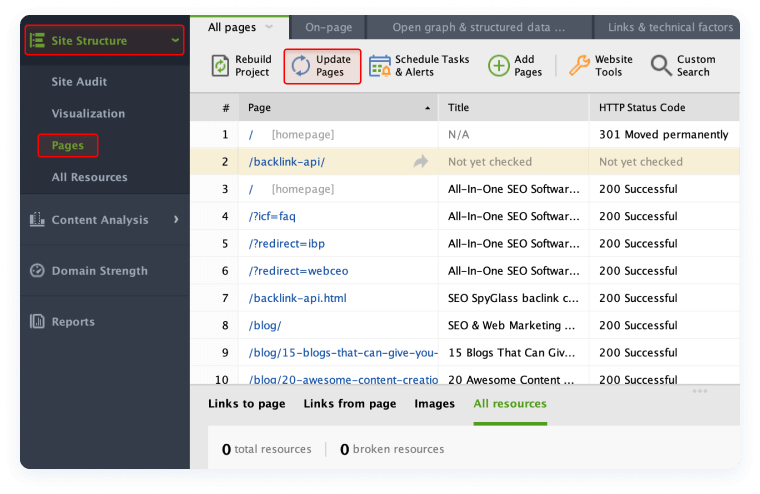
- Open your project in WebSite Auditor, go to the Pages submodule, and hit Update Pages.
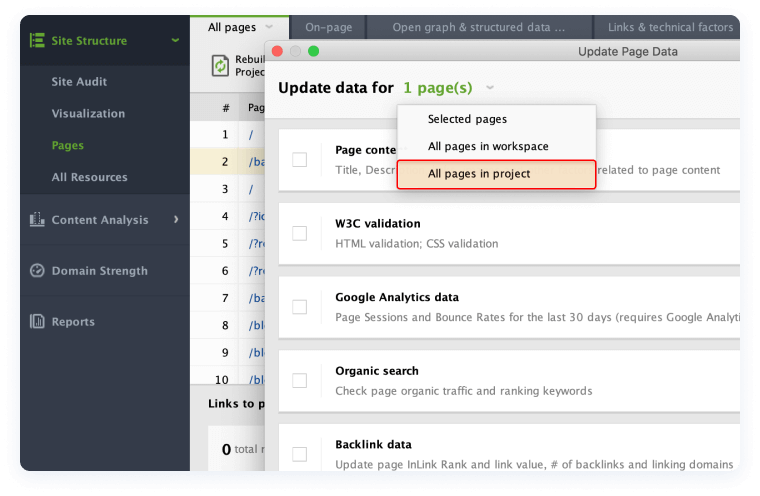
- Then, go for the All pages in project option and check all the parameters (Page Content, Page Traffic, etc.).
- Once WebSite Auditor finishes scanning your website (it may take some time), you'll get a comprehensive list of everything that should be fixed.
As a bonus for today, let's learn some magic and turn your whole website into a beautiful visualization. With the help of WebSite Auditor you can quickly find your website structure's weak spots and avoid the situations when valuable pages don't get enough traffic because of structural issues.
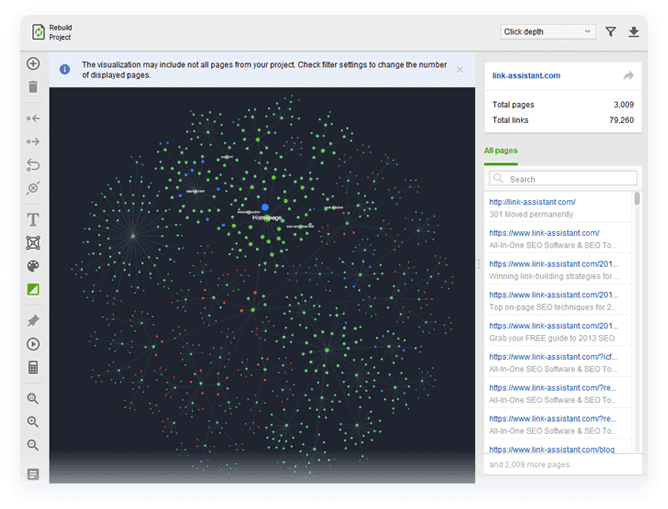
- Go to Site Structure > Visualization and wait a bit.
- Once the tool finishes generating the visualization, you'll see a graphical map of your pages and relations between them. Blue nodes are redirects. Red nodes are broken links. Isolated nodes are orphan pages, i.e. the pages that are not linked to from any other section of your site.
If you have more spare time today, check this A to Z guide to site structure visualizations.
That's all for today. Now you know how to run a website audit. If you have any questions, make sure to drop them in the comments section below.