


Calculating penalty risk, getting rid of harmful links


Now that you have a better understanding of your backlink profile, let's learn how to spot potentially harmful backlinks and get rid of them. This activity will help ensure that your backlink profile is healthy and it won't do any harm to your website's SEO.
Here's how to calculate Penalty Risk for your backlinks:
- In SEO SpyGlass, go to the Penalty Risk section, which is in the
Backlink Profile module, and hit

 symbol. Wait till the tool
updates this parameter for your backlinks.
symbol. Wait till the tool
updates this parameter for your backlinks.
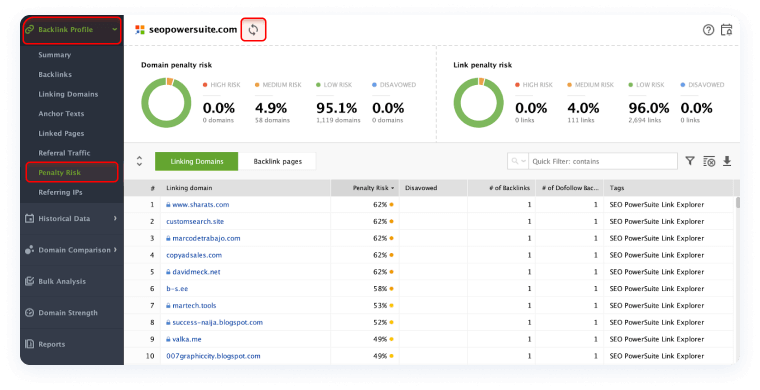
Now that you have all the info on your backlinks, you need to filter out those that are potentially harmful and get rid of them. As a rule, links that have a risk value ranging from 0 to 70% are safe. Those of 70% and higher penalty risk are harmful and can damage your site reputation.
You might be wondering where all the bad backlinks are coming from if you haven't run any link building campaign yet.
Such harmful backlinks can be the result of a spammer's attack, or those are the links to your site placed anywhere in the comment sections on spammy sites, etc.
In fact, spam backlinks are one of the most wide-known negative SEO tactics. And that's the easiest way for your competitors to do harm to your rankings.
All you can do to avoid getting spam backlinks is to regularly run a backlink audit and timely take down those that can destroy your site reputation.
Note
The best way (according to Google) to remove unwanted links is through contacting webmasters of sites that link to you asking to take down those backlinks. To get your hands on contact emails, you need to:
- Jump to the Linking Domains section under the Backlink Profile module.
- Add the Contact Info column (right-click any column), and hit the update symbol right next to the column header.
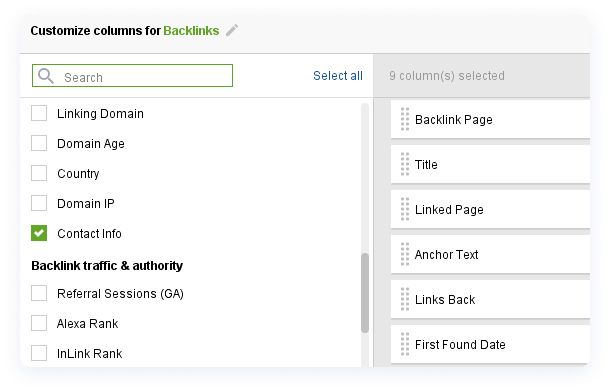
- Once the tool finishes collecting this information for you, you only need to contact site administrators and politely ask them to remove unwelcome links.
That's it for today. Now you know how to spot potentially harmful links and get rid of them. If you have any questions, make sure to drop them in the comments section below.