15350
•
16-minute read



A regular blog post has a lifespan of about a week. It is published on the company's website, promoted via social networks, sent to email subscribers, and then it goes to die somewhere on the edges of the web.
A blog post created with search optimization in mind is a completely different story. Unlike a regular post, it is able to procure its own audience and remain afloat for years to come. Create enough of such posts and you've got yourself a constant stream of free traffic. Surprisingly, it doesn't even take that much.
The higher the ranking potential of your topic, the better your return on investment. Think of it this way — it takes a similar amount of effort to create an article on most topics, but only some of those topics will have the capacity to rank in search and deliver organic traffic. Make sure you are not wasting your time on useless topics by checking them for these ranking potential indicators:
Find out whether the topic you have chosen is actually in demand with search users. To do this, take your main keyword and run it through either the Keyword Planner or the Rank Tracker.
For the purposes of this exercise, let's assume that you want to write an article about the best exercise bikes. To check this topic's search volume, you'd go to:
Google Ads > Tools & Settings > PLANNING > Keyword Planner
There, you'd enter the topic into the search volume checker and get search volume ranges for your topic as well as other similar topics:
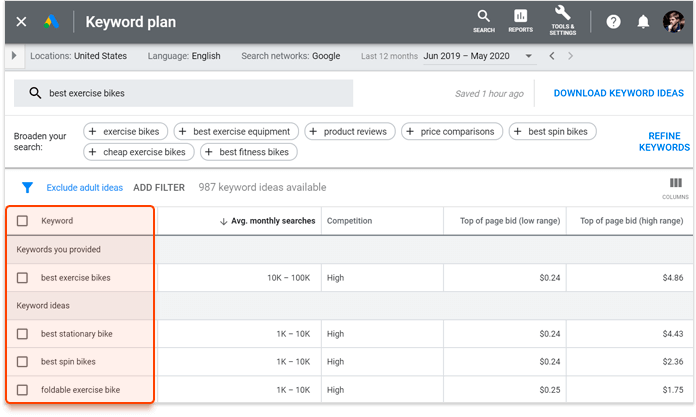
The advantage of the Keyword Planner is that it offers a bunch of alternative keyword ideas. This way you can check whether your keyword variation is indeed the most searched for and switch to a different one if it's not. The disadvantage of the Keyword Planner is that it offers only the search volume ranges, but not the exact numbers. If you are not comfortable with this kind of ambiguity, you can use Rank Tracker to discover the exact search volume of any given keyword.
To check search volume in Rank Tracker, go to:
Target Keywords > Rank Tracking > Keywords & rankings
There, click the (+) icon, add your target keyword, and see its exact search volume, as well as some other metrics, like competition and difficulty:
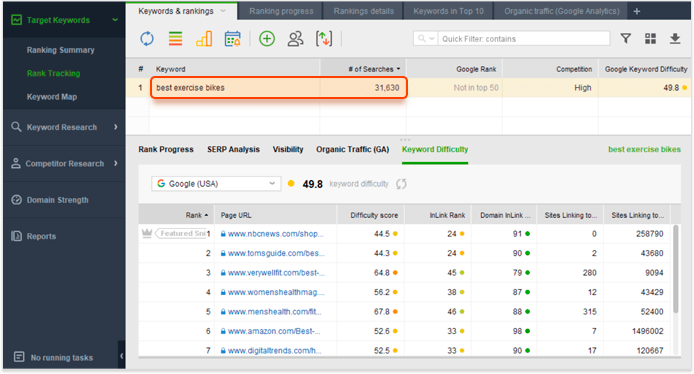
If you feel like the search volume for your chosen keyword is too low, you can use Rank Tracker for researching keywords that will serve as alternative to those with low search volume. There are nine tools to choose from and each of them approaches keyword research from a slightly different angle, so you are guaranteed to find plenty of quality content ideas.
In SEO writing, one of your goals is to create a page that will keep bringing you traffic over a long period of time. To this end, it is important to choose a topic that will either grow in popularity or at least remain popular for the foreseeable future.
For most of the topics, their longevity can be determined using common sense. But, if you want to err on the side of caution, you can assess the topic's popularity by entering it into Google Trends:
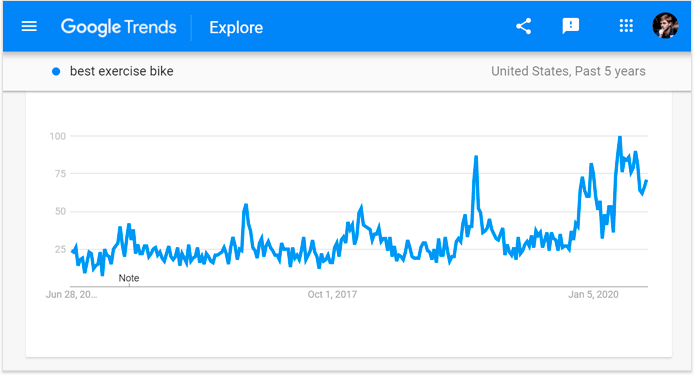
In the example above, I have checked the popularity of the 'best exercise bike' topic over the past five years. It can be seen from the graph that the popularity remains stable, peaking slightly during the winter months. Currently, the topic is actually at an all-time high, possibly due to people exercising at home for the duration of the pandemic. So this looks like a solid topic, likely to remain popular for years to come.
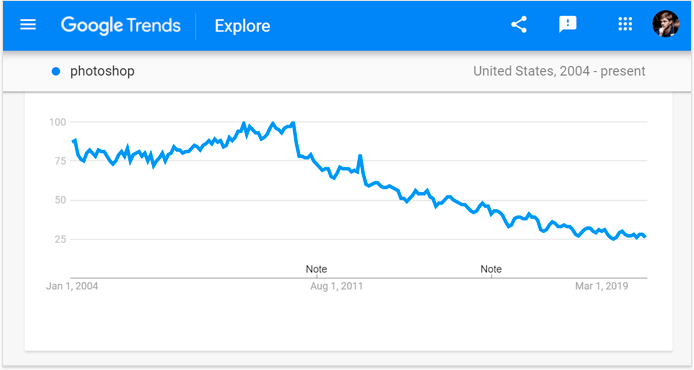
What you don't want to see in Google Trends is a topic with a consistent downward trend. For example, the interest in Adobe Photoshop has been dropping for years and it is clear from the graph that now is not a good time to produce another Photoshop-related piece of content:
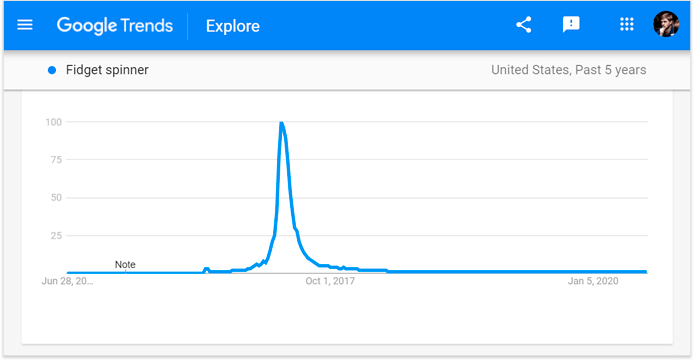
And what you absolutely don't want to see is a topic with a singular spike of interest and a flat line on either side. A good example would be any newsy topic or a temporary phenomenon, like a fidget spinner:
The final question when auditing a topic is do you have a chance of ranking on the first page of search results. The answer depends on the strength of your competitors, which can be assessed by looking at two things: their backlink profiles and the quality of their content.
The more backlinks your competitors have, the more difficult it will be to outrank them. So, the first thing to do when evaluating your ranking odds is to launch Rank Tracker and go to:
Target Keywords > Rank Tracking > Keywords & rankings
There, add your keyword to the table and switch to the Keyword Difficulty tab. In the tab, you will see a list of your top ten competitors, along with their individual difficulty scores, page authority scores, and backlink counts:
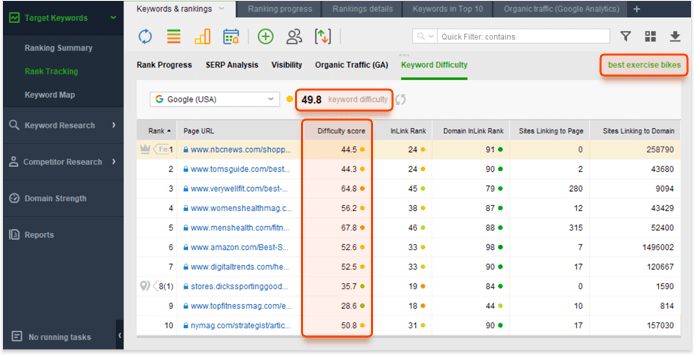
In the example above, I have checked the ranking difficulty for the 'best exercise bikes' topic, and it looks like the competition is very strong. All but two competitor websites have tens of thousands of backlinks, which means that it would be very difficult to outrank them without a comparable backlink profile.
This is where you'd have to use your own judgment — google your topic and check whether any of your competitors are vulnerable in terms of content quality. Things to pay attention to are snippet optimization, intent satisfaction, recency, comprehensiveness, and other areas where you believe you can do better.
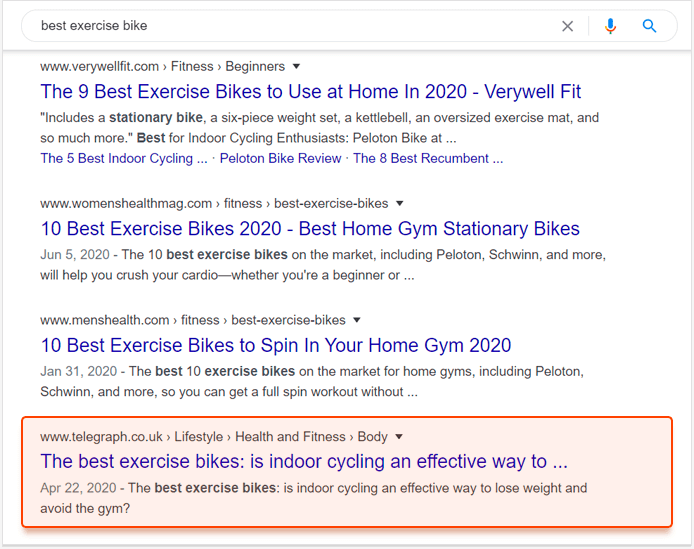
In the example above, there is one search result that looks like it might be vulnerable: it doesn't have the number of bikes in its title, it doesn't have the current year in the title, it is more about the exercise than it is about the bikes, and it comes from a news website, while all other results come from fitness websites. On these issues alone, I'd say there is a good chance of replacing this result with a better-optimized page.
Clearly, if you want to outrank your competitors, your content has to be at least as good as theirs. That is why competitor research is the best place to start when writing a new piece of content. Here are some of the content solutions you can borrow from your competitors:
Search intent refers to the type of content people expect to see when they use specific queries. Depending on the way the query is phrased, users expect to see a guide, a list, a catalog page, or a product page. It is very unlikely that you would be able to rank for any query if your content does not match the intent.
The best way to understand what kind of content is expected for your topic is to look at the content already served by Google, i.e. at the content of your competitors. If most results for your topic are guides, then you better write a guide as well. If most results are lists, then you better write a list.
In order for your piece of content to be competitive, it has to be among the most comprehensive — it has to cover the topic from the greatest number of angles. To achieve this, you first have to cover the topic from all of the angles used by your competitors, and then come up with a few angles of your own. This is what SEOs call a skyscraping technique.
The way I do it is I open all 10 of the top-ranking pages on my topic, and I copy all of their segment headings (H2s) into my draft. I then remove similar headings, arrange remaining headings in a logical sequence, and I'm left with a content outline that includes all of the talking points of all my competitors.
Another way to benchmark your content against your competitors is through the content length. You can use the average word count of competing content pieces as an indicator of how thorough their writing is. If their pieces are significantly longer than yours, then perhaps you have missed some of the details.
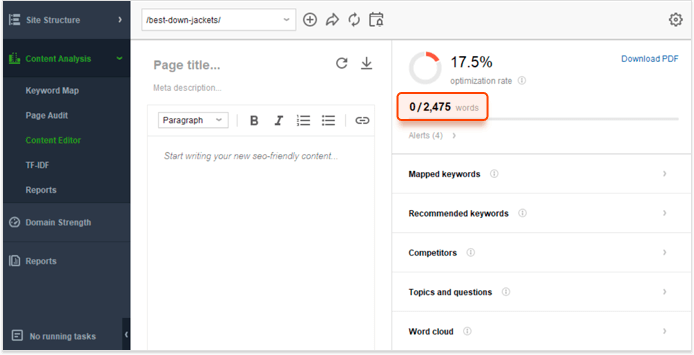
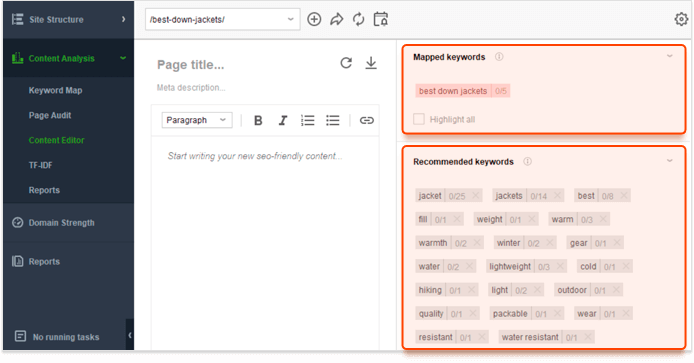
An easy way to benchmark for content length is to use the Content Editor feature of the Website Auditor tool. All you have to do is enter your main keyword and the editor will analyze competing pages and calculate the recommended content length:
The final thing you can borrow from your competitors is the keywords they have used in their content. And although exact-match keywords are not as important today as they used to be in the past, you should still be using at least some of them to make sure that Google knows what your content is about.
Again, one of the easiest ways to generate keyword benchmarks is via the Content Editor feature of the Website Auditor tool, which, in turn, is powered by a powerful TF-IDF tool. As soon as you enter your topic, the editor will generate the list of keywords used by your competitors, as well as the frequency of use for each individual keyword:
There are two guiding principles when creating content for both human readers and search engines: it has to be easy to navigate and easy to understand.
Regardless of whether you are a search engine or a human being, information is much easier to digest when it is broken down into bite-sized pieces. Logical content structure and skilled use of navigational elements, like headers and images, will dramatically improve the way your content is consumed:
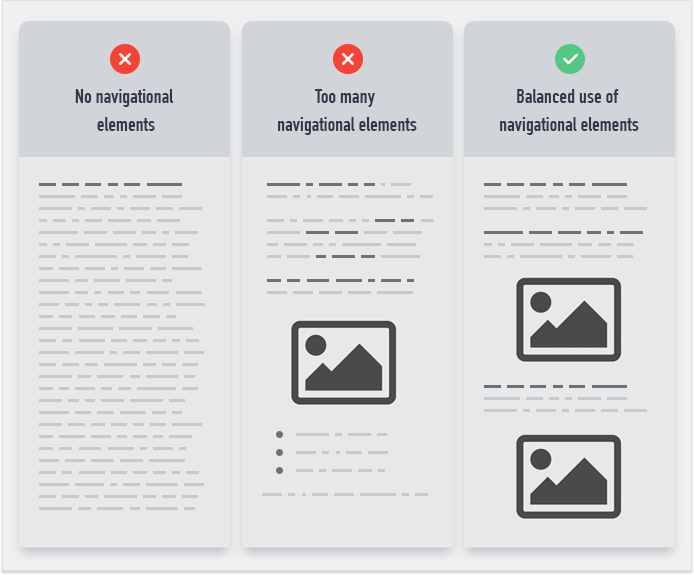
The trick here is to provide predictable navigation by remaining consistent throughout your content. Do not oversaturate your content with many different types of navigational elements — use a few of the same ones over and over, so that the users know what to look for when skimming the page. Well-crafted transition sentences are also vital for guiding readers from one idea to the next and ensuring a seamless reading experience.
Now that search engines have moved past keywords and into the semantics, it is especially important for each word you write to contribute to the meaning of the page. Here are some of the practices that might help you create pages that are both informational and user-friendly:
One of the goals of SEO writing is to create self-sufficient pages. A reader of any background should be able to land on any part of the page and be able to figure out what is going on. While it is a good practice for any type of writing, it is especially important for SEO because some of your readers are search engines and they will use only what's on the page to decide whether your piece of content is sufficiently comprehensive.
To this end, always try to provide as much context as you can think of, especially at the beginning of the article and the beginning of each segment within the article. Make it easy for readers to skip some parts of your article and start reading from a random segment — a lot of them will do that anyway and it's good UX to help them.
Try to minimize the use of adjectives and adverbs — these are largely meaningful from an SEO perspective. And they do have an opportunity cost because when you stuff your writing with adjectives they take the place of potentially valuable words. Do enough of this substitution and your content becomes diluted, to the point of being thin.
Avoid using jargon, puns, and cultural references — these may be misinterpreted by both human readers and search engines. It may seem like a fun idea to explain something using an example from your favorite TV show, but all it would do is introduce a random, semantically irrelevant element into your content.
Always try to create the path of least resistance for your readers. If something is best explained using an image or a video — add them to your content. Yes, it will mean less text and fewer keywords, but the use of media may actually differentiate you from your competitors — Google often claims that it appreciates diverse ways of presenting the information.
Even though search engines have gotten pretty good at understanding content, there are still some things we can do to steer them in the right direction. And that's exactly what HTML tags are for — they help us highlight those parts of content that are more important than others.
Arguably the most valuable HTML tag — it appears in your search snippet and communicates the topic of your content to both users and search engines. The title tag must include your main keyword and follow a format that reflects the content's search intent:
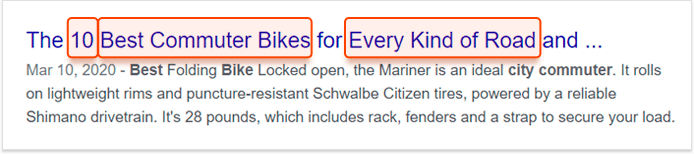
In the example above, the title indicates that the article is a listicle (10), includes its main keyword (best commuter bikes), and uses spare space to squeeze in a few salesy words (every kind of road).
The meta description is also a part of your search snippet — it appears next to the title tag and contains additional information about your page:

Since there is more room in the description, you can afford to make it more conversational. Even so, it is still important to include a few variations of your keyword. In a natural-sounding manner of course.
While the title tag is used in search results, the H1 heading is used as a title on your website. The advantage of having one title for the search and another for your website is that the second one does not have a character limit and it doesn't have to compete with other titles in SERP. While it means that the H1 heading does not have to be as optimized as the title tag, it is still advised to include some variation of your main keyword.
Headings H2 through H6 are used to tag section titles within the text, but their role is actually twofold. On the one hand, H2-H6 headings play the role of navigational elements by splitting the text into sections. On the other hand, they are seen by Google as the more important bits of text, which means that they should be written in a meaningful manner and include some variations of your keywords.
Finally, the image alt attribute is a short sentence used to describe images to visually impaired people and, coincidentally, to search engines. While it is not advised to stuff image alt attributes with your keywords, filling them out with descriptive text will help Google to see your content in its entirety.
While it is not a guarantee, there is a slight chance that your content's ranking chances can be improved with the application of structured data. In terms of search optimization, structured data has two benefits: it helps search engines better understand your content and it enhances the appearance of your snippets in search, so that instead of a plain text snippet, your search result may appear as something like this:
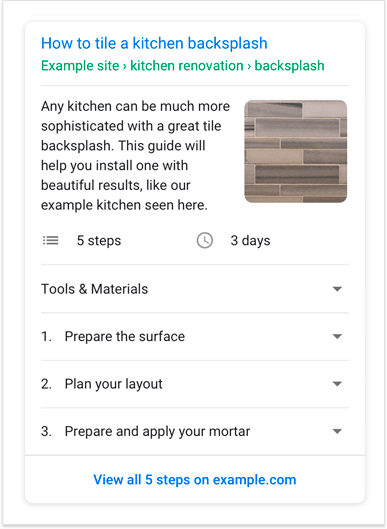
Now, while there are hundreds of types of structured data, only a few of them can be used to enhance a regular type of blog post:
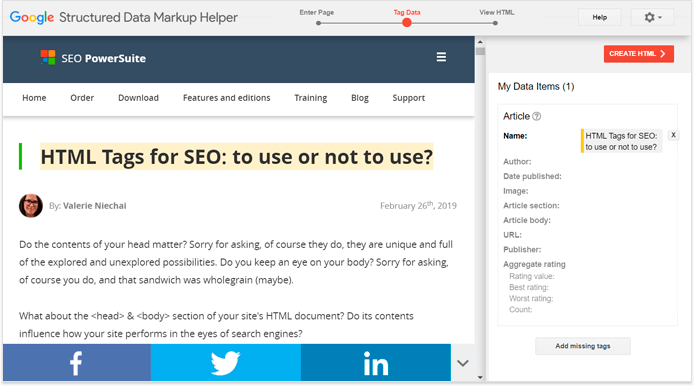
Follow the links above to learn how to apply these types of Schema to your content or, if you don't feel comfortable editing your page code, use Google's Structured Data Markup Helper for a much friendlier tagging process:
Another way for search engines to assess the importance of your piece of content is through its connections to other pages, both on your website and on other websites.
Internal links are the links leading to other pages on the same website. They are not as powerful as backlinks, but they do pass a little link juice and can be used to lend newer pages some authority.
All you have to do is link to your new content from your website's older, better-connected pages. If you are not sure which of your pages are better connected, you can use Website Auditor's visualization tool for a quick assessment of your website's architecture:
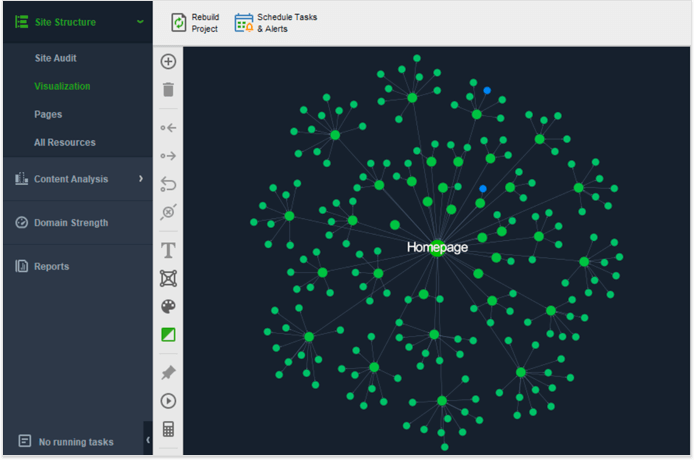
Although in general the process of internal linking is quite intuitive. You link from guides to listicles, from listicles to products, and sometimes from products back to guides — in case users need to think things over.
And by that, I mean links from your new page to high authority pages on other websites. There is some evidence that linking to quality websites may be a very tiny ranking factor, possibly signaling to search engines that you are using good sources of information for your content.
For my own content, since I'm writing about search optimization, I always try to link to the most reliable source available, which is often Google itself. If I were to create content for, let's say, a bicycle store, I would probably use plenty of links to popular bicycle manufacturer websites as well as to some biking communities.
Each piece of SEO content you create is a long-term investment of your time and effort (by the way, here's a ready-made SEO content strategy template for you to make things easier) and it is only natural that you would want to keep an eye on its performance. You could use a number of different tools for a number of different metrics, but, since we are talking search optimization, I'd say that it is most important to track the performance of your main keyword in search results.
To set this up, launch Rank Tracker, and go to Target Keywords > Rank Tracking. Click (+) to add the keyword you want to track and the calendar icon to decide on the frequency of checks. That's it, now you will be able to monitor your ranking progress and spot early signs of trouble.
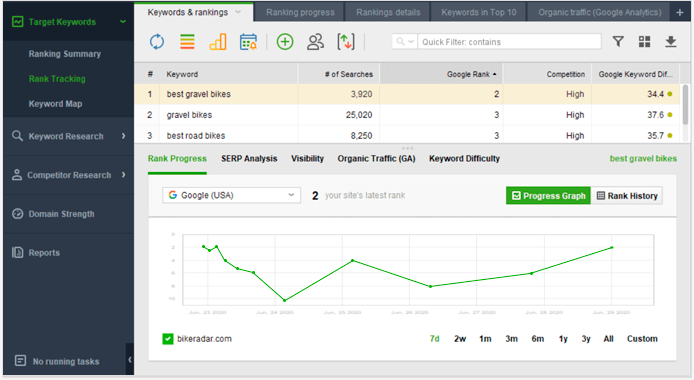
For example, your content might need more work if it gets stuck on the verge of breaking into the first page of the search results or if there is a sudden drop in rankings. The sooner you detect these problems, the sooner you stop the bleeding and restore traffic flow to your website.
It is inevitable that over time your content is going to depreciate. It will age, some of the links will break, your competitors will produce better pieces of content — whatever the reason, you are going to lose some of your positions.
The good news is that these positions are quite easy to regain — all it takes is a little timely maintenance. My advice is, whenever you publish a piece of SEO content, set up a reminder to give it an annual (or whatever makes sense) update.
When the time comes, go over the content and try to fix the vulnerabilities that have appeared over the past year: change the dates, check for new developments in the field, update statistics, remake screenshots that display outdated interfaces, make sure all the links are working properly, see if your competitors have come up with any improvements for similar pieces of content.
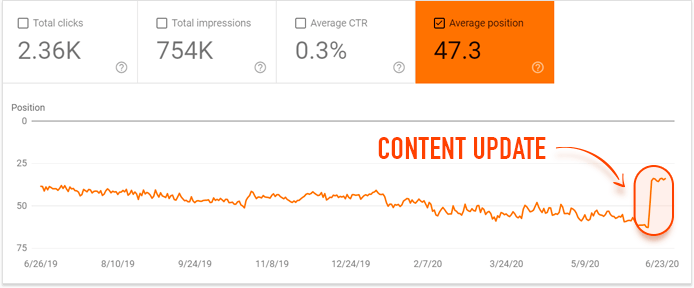
Above is a Google Search Console screenshot depicting the ranking position for one of our older posts. You can see it slipping for the past year, up until the point the post was updated and its original ranking was restored. The update took very little effort, but the effect is similar to that of publishing a new piece of content.
SEO content is more about engineering than it is about writing. It takes a good deal of research, some espionage, a little bit of actual writing, and a whole host of post-production activities. But, like any well-engineered piece, a good bit of SEO content will serve you for many years, delivering a steady stream of organic traffic.

By: Andrei Prakharevich