Welcome to Link-Assistant.Com Affiliate Resource Center
Below you'll find plenty of materials and tools to help you juice the most out of this program.
Note: To create your trackable links, you need to make sure you've registered with our affiliate program. You can find the information on how to register here.
Promo materials by type
Product reviews
One of the most effective ways to pre-sell a potential customer on a product is to write a review of the product. For our affiliates, reviews of SEO PowerSuite and other tools we offer is the number one tactic to start with.
How to write a good review
1. Be a user. To write a great review, it's best to have SEO PowerSuite in your hands. You can either purchase a license of your own or claim a temporary fully-functional review copy at affiliates@seopowersuite.com.
2. Structure and word count. Make sure your review is detailed enough (700 words+) and well-structured.
3. Clearly and accurately describe the product. It's worth providing information on features, target group (who and why should use the software), benefits and practical details: price, installation, money back guarantee etc.
4. Add screenshots. This is easy: when you have some graphic examples of what the software looks like when at work, your users will trust it more.
5. If possible, shoot a video. If you have enough time, skills and commitment to make affiliate sales, create a video review. Seeing is believing, so no wonder video software reviews get way more attention and often have higher conversion rates compared to texts.
Sample reviews
You can download sample reviews here. You can use them on your own site (a quick rewrite is recommended) if you wish, or just look at them as an example of how a review could be written. Click on the links below to download the reviews:


Forums, blogs and social media
A lot of people ask us: "Is there a way to start earning money with your affiliate campaign with zero investments?" The answer is — YES.
Even if you don't have a website you may still distribute text affiliate links all over the Internet and earn your affiliate commission.
There are three main areas, where you may get traffic with the affiliate links:
- Social media
- Forum signatures & comments
- Blog comments
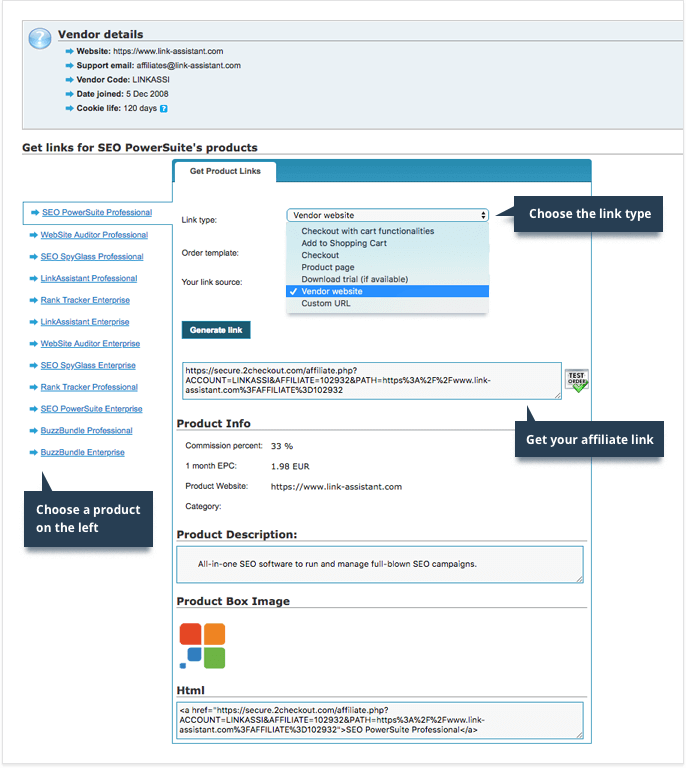
To generate your affiliate links, please use your affiliate dashboard.
Here are more detailed recommendations for working with social media, forums and blogs.
Social Media
Not of all us can boast of Twitter or Facebook profiles with thousands of followers, that's why a mere update on your timeline with an affiliate link would hardly turn into sales.
Be proactive instead. It's a good idea to search for people interested in the SEO topic and looking for tools — and reach out to them. Tools like Awario help a lot in finding relevant discussions.
The recommended practice is to use URL shorteners for your affiliate links with services like bit.ly. What is important, the service provides the detailed stats for each bitmark (shortened URL): referrers, number of clicks, and user locations.
Forums
There are several strategies you may employ to get traffic from forums:
- For forum signatures, you can get fresh ideas here, including some ready-made texts for signatures.
- Search for the discussions related to the product and post affiliate links. Search Google and use tools like Awario to find forum threads, where SEO software or SEO tools are discussed. The holy war threads (like Market Samurai vs Web CEO vs what-ever-you-are-affiliated-with :) are the best. If someone asks "Hey guys, what's the best keyword ranking tool out there?" you may jump in and say "Rank Tracker rocks! Bla-bla-bla" (don't forget to insert the affiliate link). This approach lets you target the audience, which is really interested in the product.
- Important: Don't be spammy. Make a contribution to the community, be helpful, and share your experience.
Blog Comments
The approach is simple: find the right conversation, participate, and share the affiliate link. In order to improve the success rate first read what other people are saying in comments so that you don't repeat their thoughts, and try to add some value to the discussion.
Products images
Do you need ready-made screenshots of SEO PowerSuite tools? We're saving your time here.
For your convenience, we've collected all available product images (screenshots, icons, banners) that you can use while promoting SEO PowerSuite. You can download all the images as one archive below.
Go to BlueSnap and log in to your affiliate account. When you're logged in, in the Dashboard you will see a 7-digit number next to your name:
This is your affiliate ID. Copy it and paste in this form to generate your affiliate links.

 link-assistant.com