SEO PowerSuite vs. Moz review
This is a comparison review of two major SEO packs: Moz(SEOMoz) vs. SEO PowerSuite.
How does one find the best SEO software that saves time, cuts down expenses and still brings amazing results? In most cases, the dilemma comes down to choosing between:
- web based Moz (formerly SEOMoz)
- desktop based SEO PowerSuite
There are probably more SEO PowerSuite vs. Moz reviews across the Web than needed, but you can't evaluate something until you hold it in your hands and give it a try. That's exactly what we did, and here are the results.
Summary
 SEO PowerSuite
|
 MOZ
MOZ
|
|
| Free trial |
Unlimited time No card required |
30 days Card required ($1 charge) |
|
Price over the 1st year (Pro version) |
$349/year | $1188 |
| Projects | Unlimited | 5 |
| Backlinks | unlimited backlinks per site | up to 10,000 per site |
| Data delivery | Immediate | 7 days wait |
| Active users | 50,000 | 27,000 |
|
Moz Pros
Moz Cons
The Verdict: 8.8/10 |
||
Try SEO PowerSuite to see how much more powerful it is, or read on to find out the details about Moz.
For our SEO PowerSuite vs SEOmoz review, we've used Professional versions of both software tools, Moz PRO ($99/month) and SEO PowerSuite Professional ($349/year).

"For Moz, I still don't understand why SEO agencies are paying for such a useless product at that price. The only value I see from Moz is its Open Site Explorer, Moz metrics and site comparisons.
Other than that, SEO Powersuite provides 10x more value than Moz."
Stanley Tan from OwlGuru.com
To run our comparison in the most objective way, we've split the typical SEO campaign workflow into 5 must-do stages both tools will assist us at:
1. Keywords research
2. Rank tracking
3. On-page audit (tech and SEO)
4. Content optimization page by page
5. Backlink research and link building
OK, let's start the party! Now we are going to check Moz Pro vs. SEO PowerSuite Professional far and wide!
1. Keyword research
Any SEO campaign starts with keyword research. It lies in finding profitable keywords to optimize your site for, thus getting maximum traffic with minimum effort.
Both SEO PowerSuite and SEOmoz have functionality for this SEO task. In SEO PowerSuite, this is done with Rank Tracker tool. In Moz, there is a Keyword Difficulty tool and a Rank Tracker module. Let's see what they can offer.
Step 1. Find keywords ideas
Of course each of us can think of a couple keywords for a website (or even a few dozen keywords, depending on the niche). However we always look into an SEO tool for suggestions. New ideas that we hadn't figured before.
SEO PowerSuite's Rank Tracker offers 20+ methods of suggesting keywords. Using these methods and just one seed keyword or key phrase, you can get thousands of keyword suggestions. After further research, you start optimizing your site for the most profitable (and sometimes the least obvious) search terms. And, you don't have to worry about duplicates from different sources — SEO PowerSuite's tool will exclude all duplicates automatically.
Moz, however, does not offer keyword suggestions. It pulls in appr. 20 obvious keywords or phrases from your website, but from there, you've got to brainstorm new keywords all by yourself.
Which means Moz is of totally no help in spotting new keyword opportunities — you end up with the keywords you already have on your site.
Step 2. Analyse keywords and choose the most profitable ones
After you compile a keyword list, you can check the following metrics for the terms you've got.
In SEO PowerSuite's Rank Tracker:
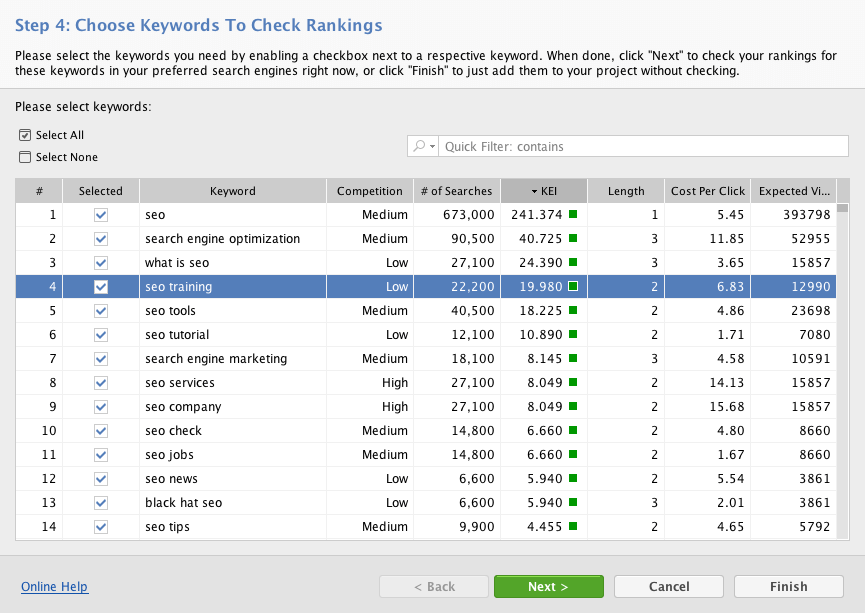
- Your current search engine rankings for each keyword
- Estimated visits — the number of visits your website can potentially get if it ranks #1 for the keyword
- The number of searches each keyword gets per month
- Competition for these keywords in different search engines (Google, Yahoo, Bing, Yandex, Naver and others in any country you need to check).
- Keyword efficiency index (KEI) — competition to the number of searches ratio. KEI is about the most reliable criteria used to identify how SEO-lucrative a keyword is.
- How much traffic your site gets via each search term right now
- Estimated PPC costs per month — how much you'd pay for PPC ads if you wish to get paid traffic instead of or alongside free organic search traffic.
In Moz:

- Keyword difficulty
- Bing Search Volume
- SERP analysis (authority of other pages that rank for keywords)
The problem here is that you have to see SERP analysis for keywords one by one. This makes it inconvenient to compare keywords to each other. In SEO PowerSuite, you can see all vital factors at a glance and compare your keywords in one convenient view, and the most profitable keywords are indicated so that you can make your selection faster, without having to switch here and there.
Another inconvenience is that you've only got 300 keywords per account. It's not a lot even for 1 website. And if you have more than one website to look after, you'll have to split the 300-keyword limit between all of them.
So, in short, here's the difference between the two tools:
|
Moz
|
SEO PowerSuite
|
|
Lets you create 5 active campaigns
|
Lets you create unlimited number of projects
|
|
Lets you monitor up to 300 keywords per 5 campaigns
|
Lets you monitor an unlimited number of keywords
|
|
Does not offer/suggest new keyword opportunities
|
Provides new keyword ideas for your SEO campaign (20+ different sources for keyword suggestions)
|
|
Lets you analyze keywords against
- Keyword difficulty - SERP analysis |
Lets you analyze keywords against
- The number of searches - Competition in any Search Engine and country - KEI - Estimated Visits from search - Actual Visits from search - Current rankings in any SE and country |
|
Lets you check the number of visits each keyword brings to your site — in a separate view
|
Lets you check the number of visits each keyword brings to your site — in the same view where you analyze keywords
|
|
Lets you check no more than 200 rankings a day
|
Offers unlimited checks for keyword rankings
|
Impressed with SEO PowerSuite's keyword research capabilities? Try it for Free right now!
2. Rank Tracking
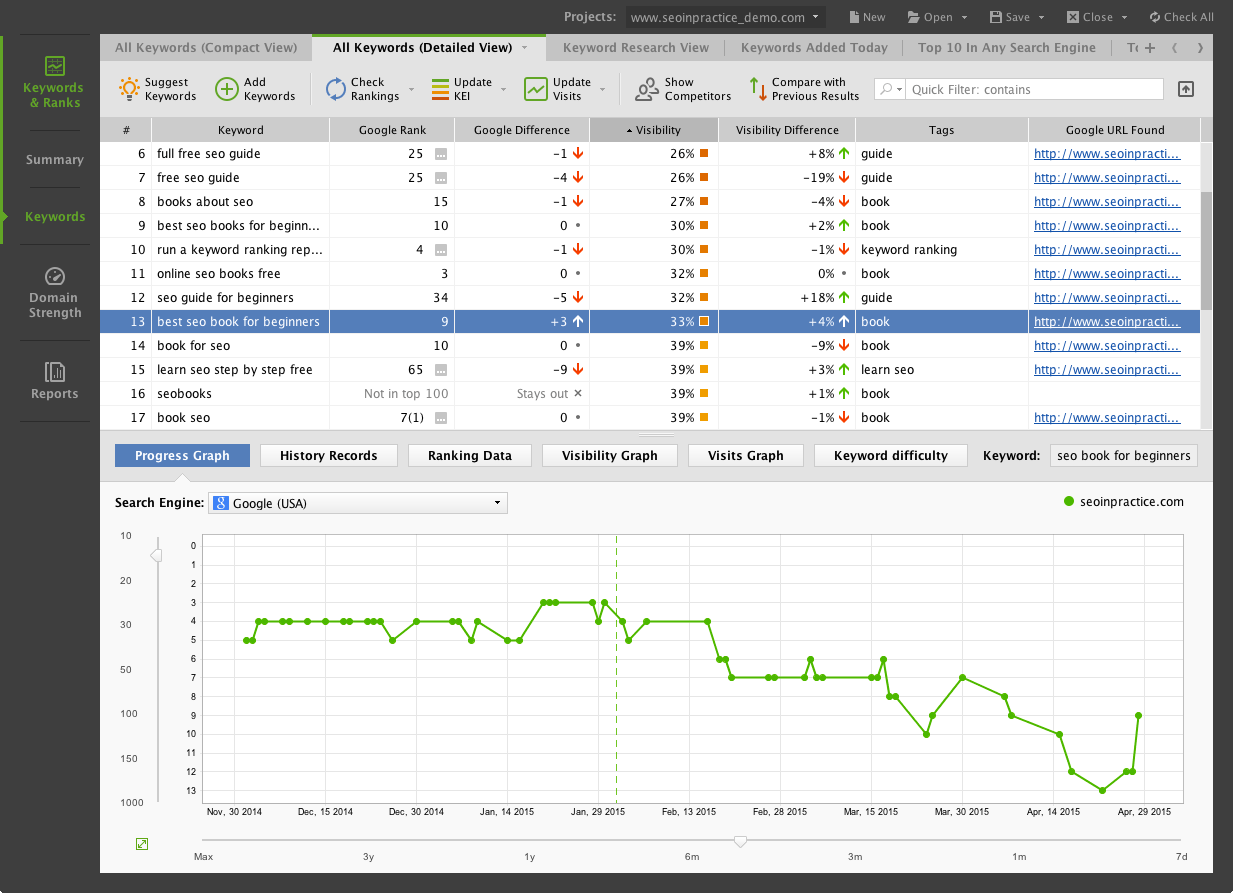
When you're doing SEO, you have to see where your site ranks in the search engines of your choice for the keywords you target. Rank tracking is an integral part of any SEO campaign, as it helps you make sure you are headed in the right direction at each step of the process.
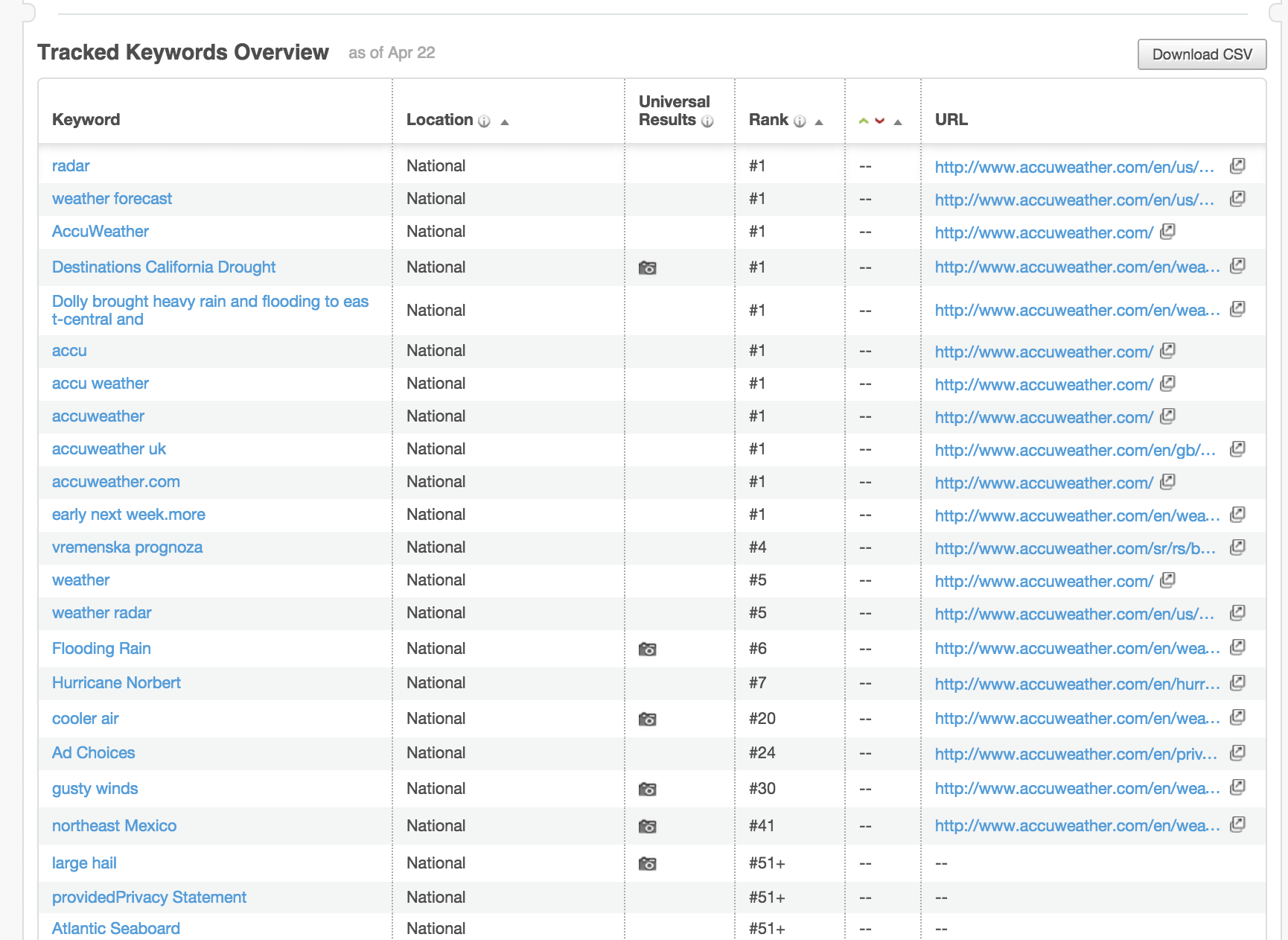
As we mentioned earlier, both Moz and SEO PowerSuite have a Rank Tracker in their arsenal. And there are some similarities in the information they provide. For example, both SEO tools:
- Tell you where your site ranks for your target keywords;
- Tell you the exact URLs that appear in the search results;
- Let you track Universal Search rankings (Videos, Images, etc.);
- Record rankings history and build progress graphs;
- Offer rankings reports.
But of course, there are certain differences, too:
|
Moz
|
SEO PowerSuite
|
|
Lets you create 5 active campaigns (= projects/websites)
|
Lets you create an unlimited number of projects
|
|
Lets you track up to 300 keywords per 5 campaigns
|
Lets you track an unlimited number of keywords
|
|
Lets you check only 200 rankings per day
|
Lets you check an unlimited number of rankings or keywords daily
|
|
Supports only 3 search engines (Google, Yahoo, Bing)
|
Supports 456 local and international search engines
|
|
Goes only 50 positions deep in a rank check
|
Goes up to 1000 positions deep in a rank check
|
|
Tracks rankings once a week
|
Tracks rankings as often as you need it
|
|
Lets you add only 3 competitors
|
Lets you add up to 5 competitors (10 with the Enterprise license)
|
|
Lets you compare your current ranks only to your previous results
|
Lets you compare your current ranks to your previous/last week/last month/best/worst results, and so on.
|
|
You get only one SEO report per week, which is sent to your email
|
You can run a new SEO report any time (and save it or email/upload it with the Enterprise license)
|
|
Does not track rankings in Mobile SEs like Google on mobile.
|
Tracks mobile rankings
|
|
Does not track video rankings in YouTube
|
Tracks rankings of your videos on YouTube
|
The verdict: Moz is far less powerful in rank tracking than SEO PowerSuite. If you wish to check out how much SEO PowerSuite's Rank Tracker can do for you, you can download it right now:
3. On-page audit (tech and SEO)
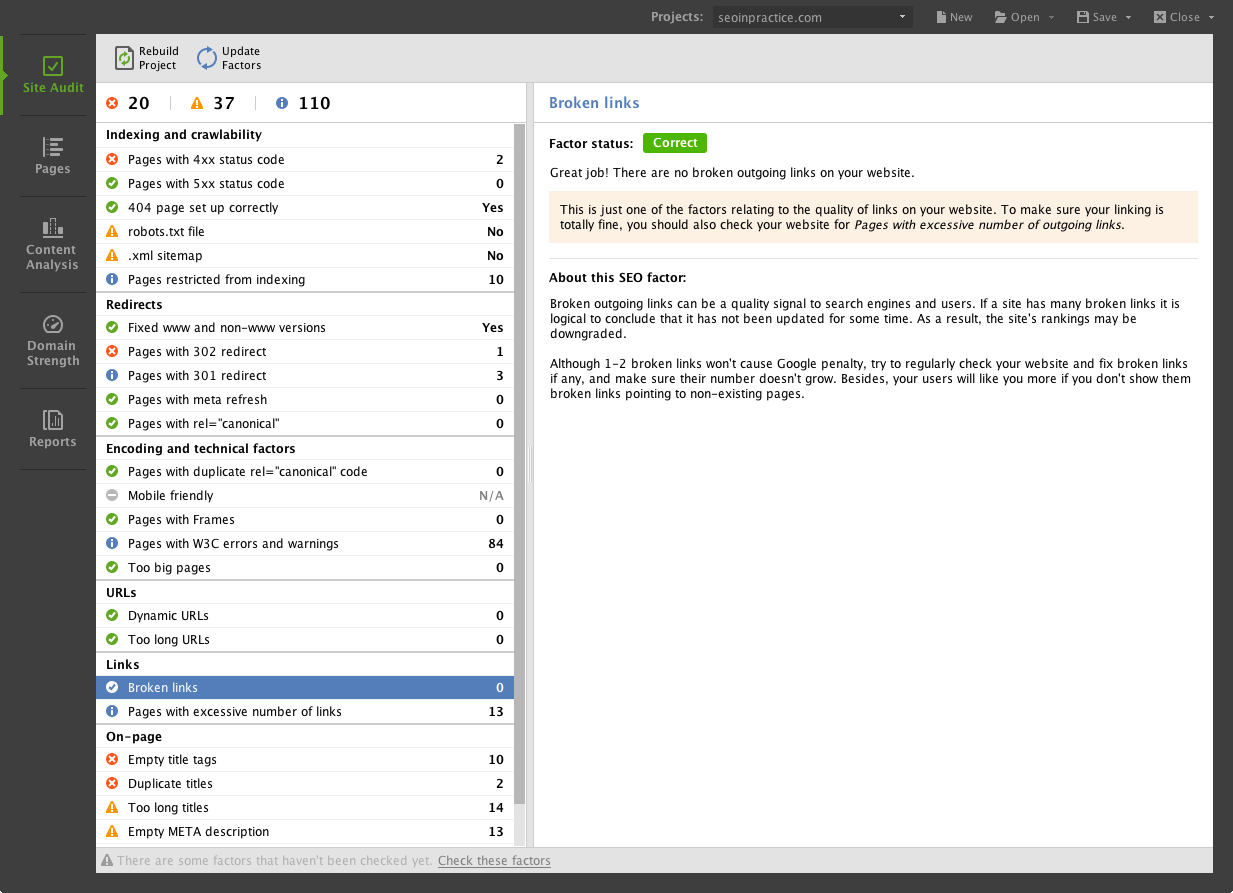
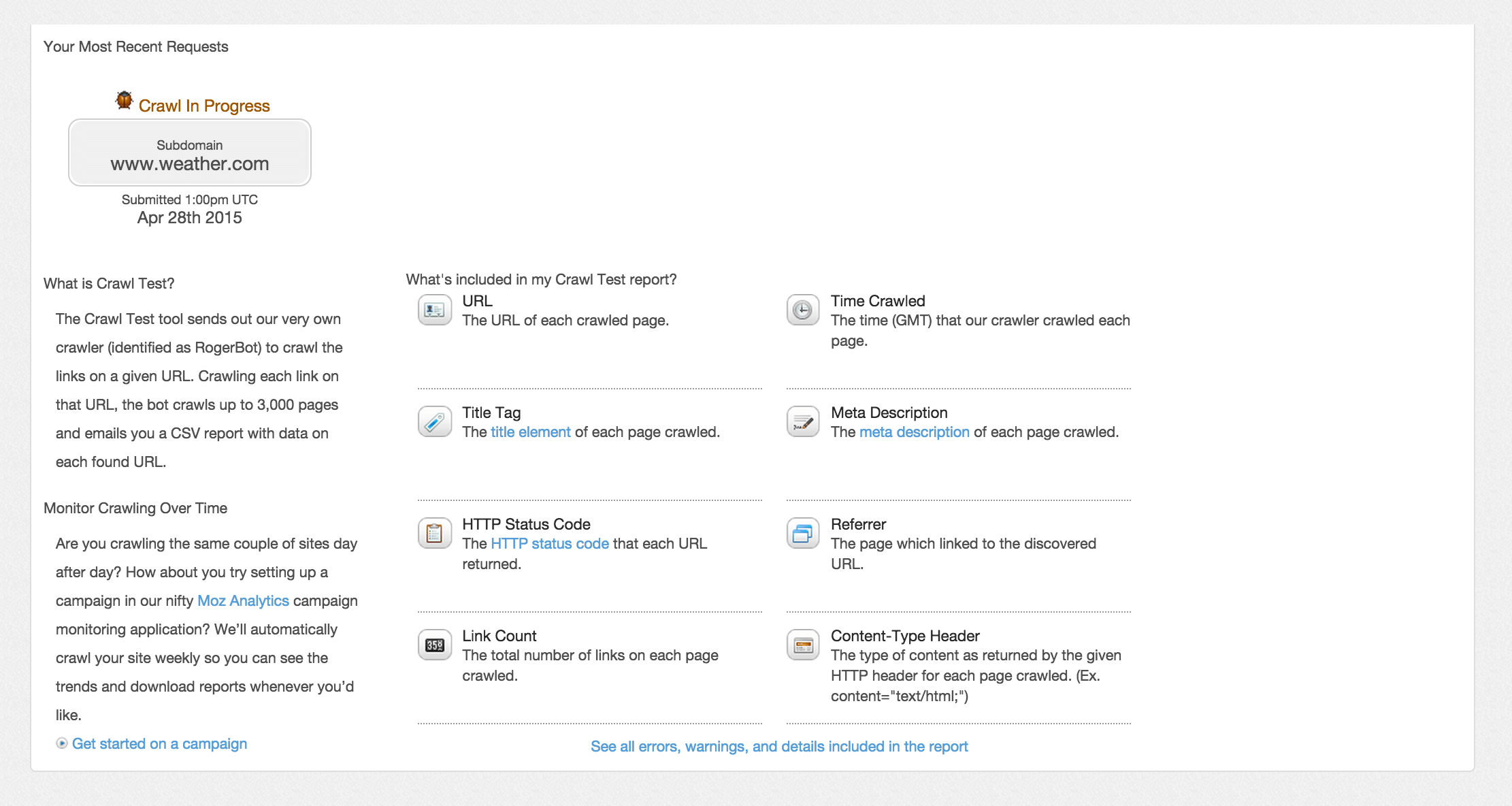
When you're looking at on-page SEO of an existing site, most likely the first thing you do is scan the whole website to find any errors in its code, all the tiny invisible things that may prevent your website from high rankings.
Moz (Crawl Test tool) and SEO PowerSuite (WebSite Auditor tool) will both crawl your site and report various issues:
- Server response status codes of your webpages
- Broken links found on your website,
- The total number of links on the page,
- A list of pages with duplicate content and/or empty HTML elements
- Webpages with redirects and canonical tags
- Pages with too long titles etc.
However, Moz only crawls up to 3,000 pages per subdomain, and you can only run 2 crawls per day. SEO PowerSuite does not limit you in this.
Moz offers very little technical diagnostics (ex. no HTML and CSS validation errors), it does not look into Mobile SEO issues which grew very important after April 21, 2015 and does not analyze social popularity (Facebook, Twitter mentions) of your pages.
Again, for your convenience, here is a summary of how both SEO tools take care of on-page:
|
Moz
|
SEO PowerSuite
|
|
Crawls only 3,000 pages per domain/subdomain.
|
Crawls any number of pages you specify to crawl
|
|
Offers 2 crawls per day only
|
Unlimited number of crawls, any time you need them
|
|
Does not offer technical site audit
|
Provides technical audit alongside content and structure SEO audit
|
|
Provides on-page analysis (grade) for any page you specify
|
Provides analysis (grade) for any page you specify
|
|
Offers advice on fixing found on-page SEO issues
|
Offers advice on fixing found on-page SEO issues
|
|
Does not offer mobile optimization tools or advice
|
Does a mobile SEO check and offers optimization advice
|
|
Does not generate sitemap and robots.txt file
|
Lets you generate and regularly rebuild sitemap and robots.txt file
|
|
Does not analyze social popularity (Facebook, Twitter mentions/likes) of your pages
|
Reports on social popularity of your site's pages
|
This is where you can try SEO PowerSuite and see how much more powerful and structured its WebSite Auditor tool is.
4. Content optimization page by page
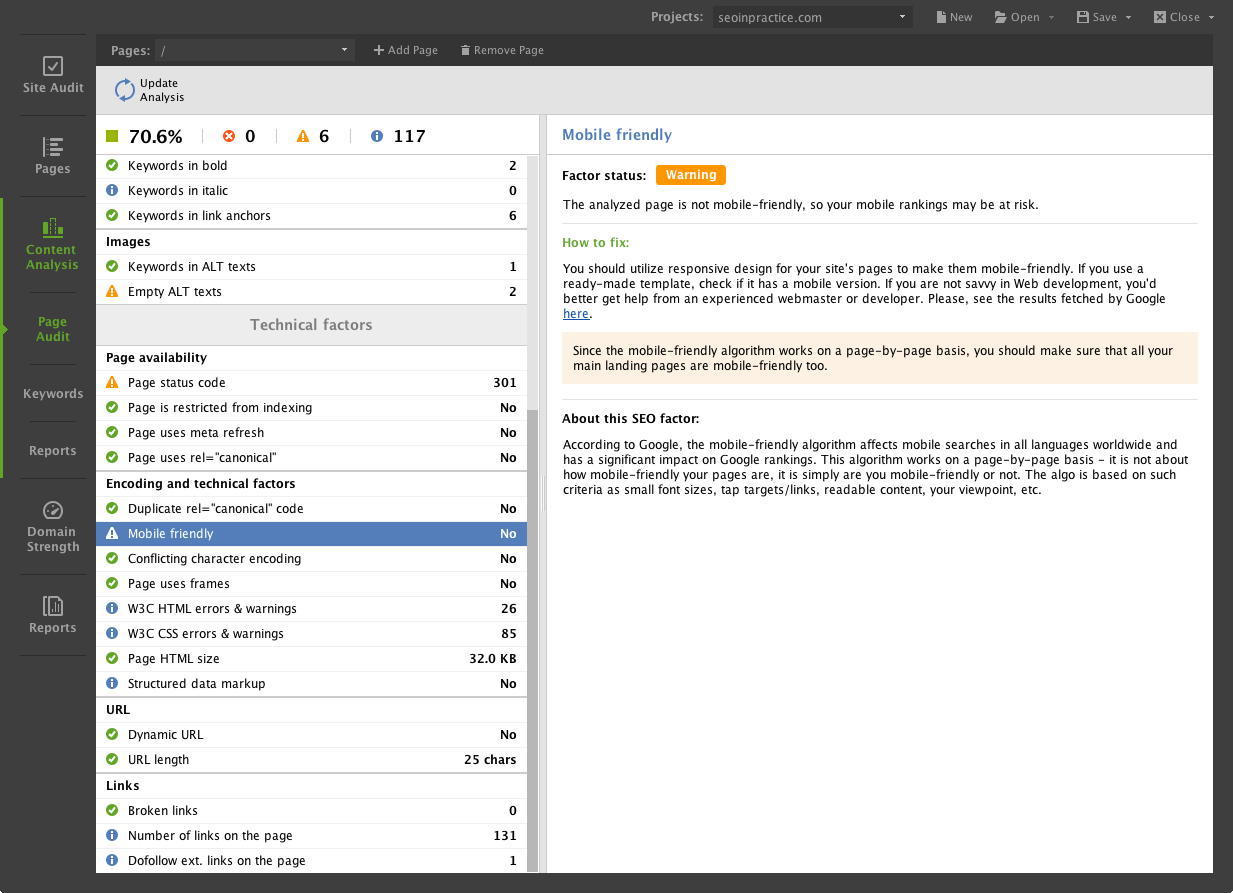
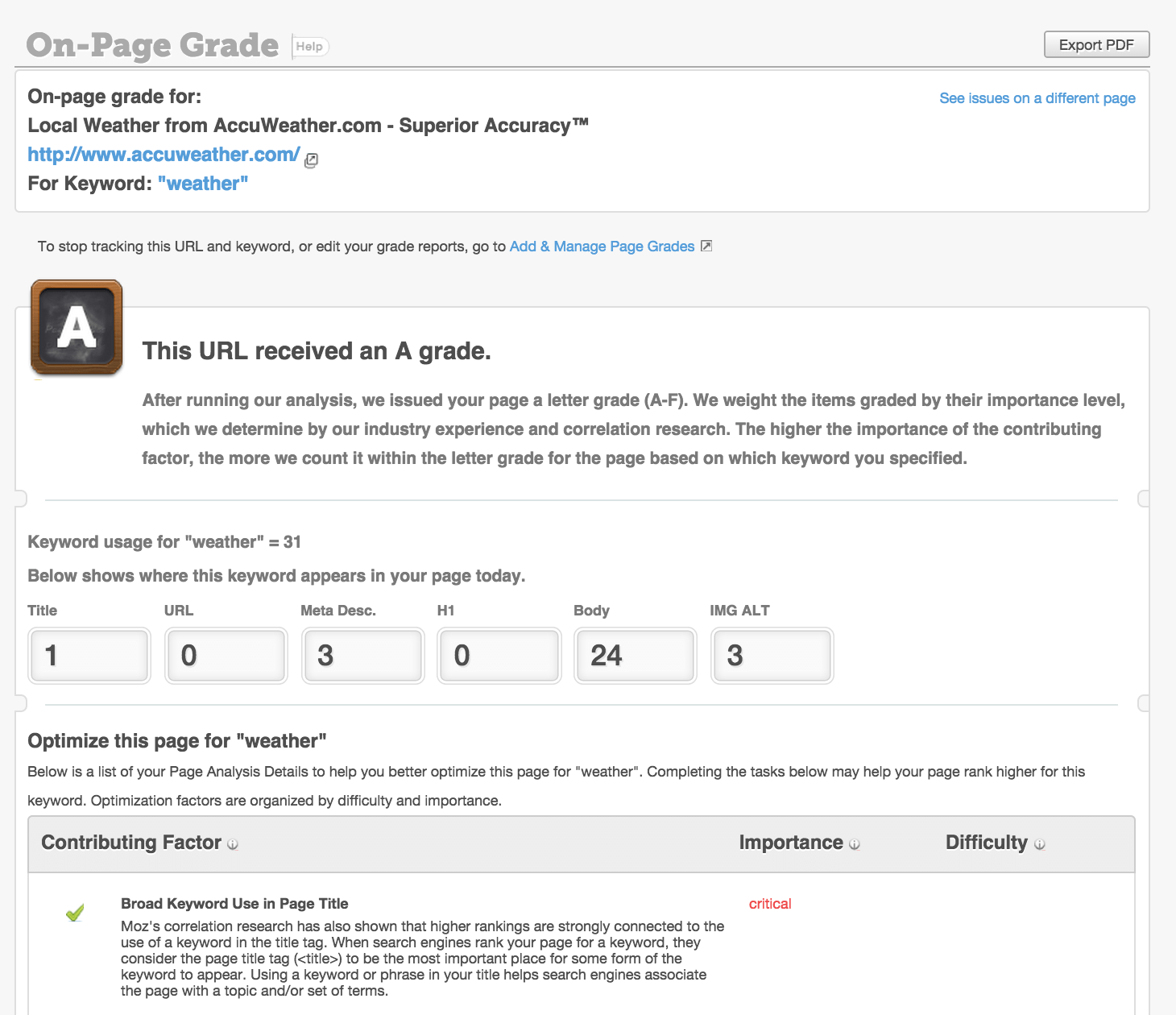
First, let's see what Moz onpage tool can do to help you with content optimization. It:
- Calculates the optimization grade of any page
- Lets you analyze content of any webpage for 1 keyword at a time
- Gives recommendations on fixing the issues if there are any
- Advice is based on general rules (not on the competitive research for the site's exact niche)
And here is what you can do with WebSite Auditor from SEO PowerSuite:
- Check the overall optimization rate of any webpage on the site
- Check the optimization rate of each separate page element (title, description, etc.)
- Get a winning keyword density for each page element based on competition research
- Spot the best amount of key terms to use on the webpage
- Create a clear-cut Page Optimization report
- See any webpage through Google's eyes with a Search Engine View report
- Get advice on fixing any issues, based on competition research in your site's niche
The recommendations that WebSite Auditor provides are based on competition analysis. This on-page SEO tool runs a real-time scan of the top 10 sites ranking for the keywords you specify, which ensures that the content strategy it puts forth really helps you rank higher under the latest search engine ranking algorithms.
Content optimization in Moz vs. content optimization in SEO PowerSuite, distilled:
|
Moz
|
SEO PowerSuite
|
|
Lets you analyze site content for 1 keyword at a time
|
Lets you analyze site content for several keywords at once
|
|
Offers advice on fixing found on-page SEO issues
|
Offers advice on fixing found on-page SEO issues
|
|
Does not offer mobile optimization tools or advice
|
Does a mobile SEO check and offers optimization advice
|
|
Provides content optimization tips based on in-house standards
|
Provides content optimization tips based on the standards used by Google and other Search Engines (based on niche competition research)
|
Willing to start content optimization right now? Let WebSite Auditor give you a hand — get yourself a Free copy of SEO PowerSuite with WebSite Auditor included.
5. Backlink research and link building.
Links from related websites are a must if you want to hit search engines' tops. But how can an SEO find appropriate websites to get backlinks from? Surely, the safest way is to follow a battle-tested path, that is, the path of your top-ranking competitors. Hence, in order to create a backlink strategy, an SEO would normally see sources their most successful competitors have got their backlinks from.
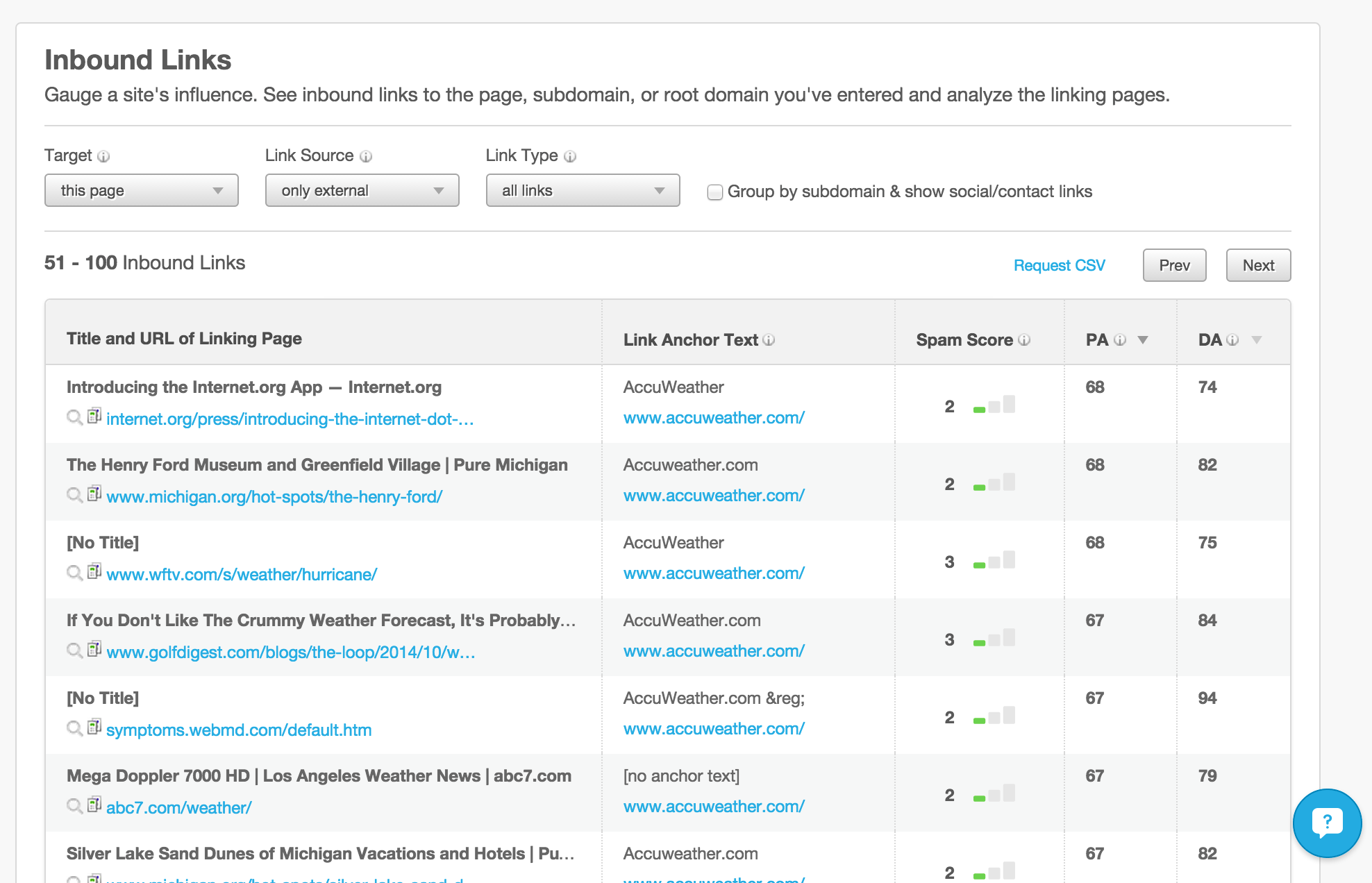
Moz offers its service Open Site Explorer — the database of backlinks which you can use if you are a Pro subscriber. Using this resource you can see:
- The number of links a site has (internal/external, dofollow/nofollow)
- Each linking page's title
- Each linking page's URL
- Links' anchor texts
- Each linking domain's authority
- Each linking page's authority
- Spam score
The most essential drawbacks in Moz are:
- You only get 10,000 links max.
- When you compare link profiles of several sites (up to 3 competitors), you only get a very basic comparison.
- You can not get a list of backlinks from a certain domain
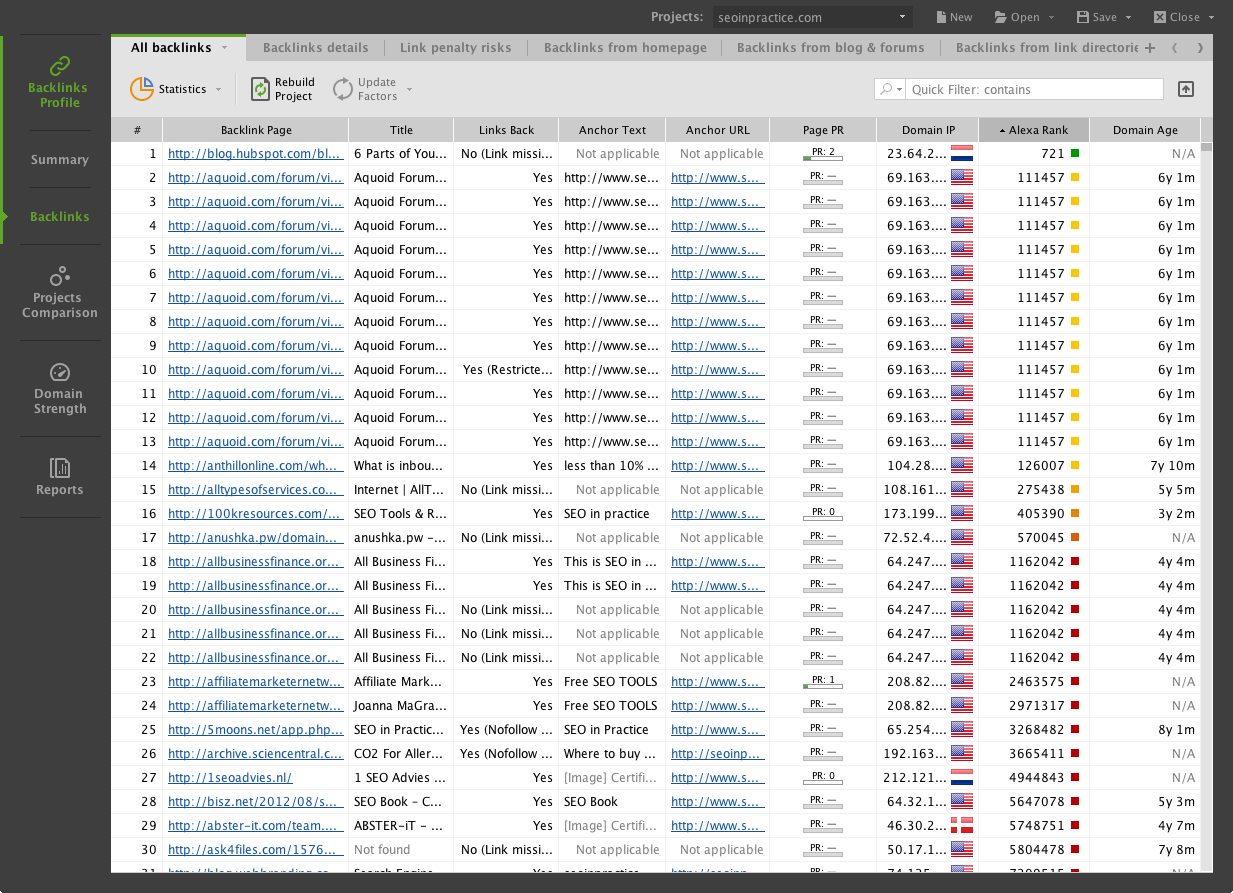
SEO PowerSuite's backlink checker is called SEO SpyGlass.
Unlike Open Site Explorer, SEO SpyGlass uses a mixed set of backlink databases to collect backlink intelligence from. These include (1) SEO PowerSuite Link Explorer, (2) Google Search Console, (3) Google Analytics. This helps SEO SpyGlass give you the fullest picture of backlinks pointing to any site.
Here's what you get to know with SEO SpyGlass:
- A full list of backlinks pointing to a site (unlimited number of backlinks can be reported)
- Page Authority (PA) for each linking page
- Domain Authority (DA) for each linking page
- Each linking page's title
- Each linking page's URL;
- Links' anchor texts
- Each linking page's Google PR
- Each linking domain's Google PR
- Each linking domain's IP address
- Each linking domain's age
- Each linking site's Alexa and Compete ranks;
- Each linking page's indexation information;
- Each linking page's social media popularity;
- Each backlink's SEO value, etc.
Here is a convenient summary of Moz vs SEO PowerSuite for backlink research and link building:
|
Moz (Open Site Explorer)
|
SEO PowerSuite (SEO SpyGlass + LinkAssistant)
|
|
No more than 10,000 links per domain
|
Unlimited links per domain
|
|
The backlink data is retrieved only from one source
|
The backlink data is retrieved from multiple sources (SEO PowerSuite Link Explorer, Google Search Console, Google Analytics)
|
|
Link index size: 324 billion linking pages
|
Link index size: 1.6+ trillion linking pages
|
|
No list of backlinks pointing from a specific domain
|
A full list of backlinks pointing to a site from each domain
|
|
Separate stats on linking domains
|
Separate stats on linking domains
|
|
Only basic information about each linking site is provided
|
Plenty of SEO metrics on each linking site are collected
|
|
No social media popularity of the linking site is reported
|
Social media metrics for each linking site are provided
|
|
You can compare up to 4 websites
|
You can compare up to 5 websites
|
|
Comparison of competing site's link profiles is very basic
|
You get a very detailed side-by-side comparison of websites' link profiles
|
|
Does not find contact info for potential links
|
Digs up the contact info for websites where you can request a link (LinkAssistant)
|
|
Does not monitor link profile growth over time
|
Monitors link profile growth over time (LinkAssistant)
|
So, which SEO tool wins the battle?
Now, after we have seen how both SEO packs perform at each stage of the SEO cycle, Moz tools appear to be rather limited compared to the SEO PowerSuite toolkit. In the course of our review, SEO PowerSuite has repeatedly beaten Moz in terms of features, flexibility, restrictions (SEO PowerSuite has almost none) and price!
But don't take our word for it. If you still have doubt, try it out!
Download SEO PowerSuite pack for Free, or order a full version straight away: